 EN
EN  PL
PL  DE
DE 


Salesbook eSign: fast and secure document signing

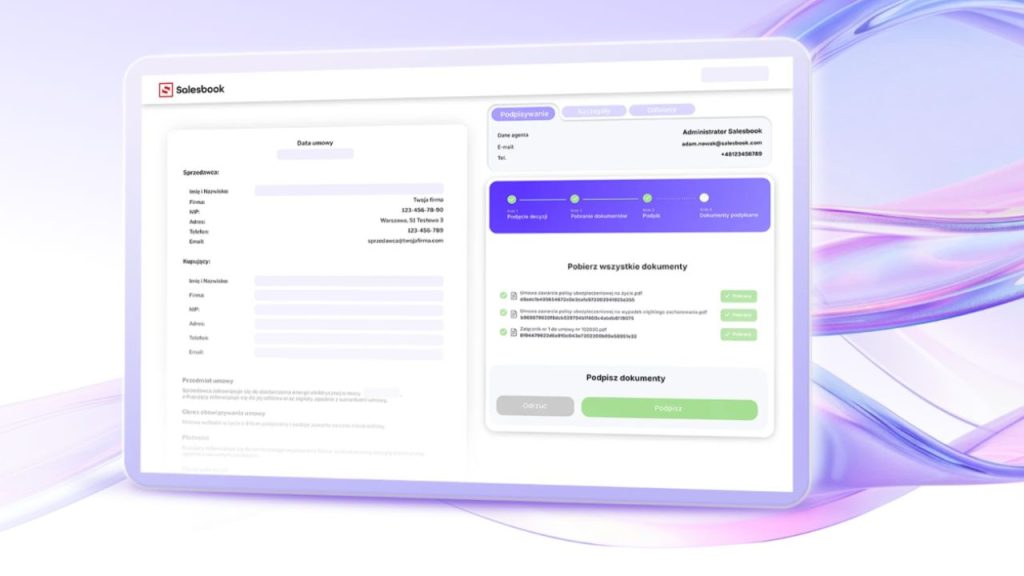
Signing contracts is still one of the most frustrating stages of the sales process: files circulate via email, versions multiply, the document status is unclear, and the sales rep – instead of selling – monitors PDFs. Salesbook eSign organizes this process from start to finish, enabling fast and secure online document signing without leaving the CRM system and without the risk of losing control over the contract.
Electronic signature in B2B sales – why old methods no longer work
In theory, everything is simple. The contract is ready, the client is interested, the decision has been made. In practice, this is exactly where sales very often get stuck. Not at the proposal stage. Not during negotiations. But at the signature.
The most common problem is document version chaos. A file sent by email, a quick correction introduced, another version saved as “final_v7_corrected.” The sales rep loses track, and so does the client. No one is certain which document is current and which one should actually be signed. Instead of closing the sale, unnecessary confusion appears along with the risk of error.
Additionally, there is a lack of control over the contract status. The document has been sent, but what happens next? Has the client opened it? Has it been forwarded to legal? Has it been stuck in an inbox? The sales rep has to follow up, send reminders, and send additional emails. The manager cannot see at which stage the transaction is. The sales process becomes unpredictable.
The result is delays on both sides. The client postpones signing “for later” because the document got lost in emails. The sales rep, instead of working on new sales opportunities, handles administrative tasks. A contract that could have been signed in one day drags on for a week or two. And in B2B, this often means a real risk of losing the client.
What is Salesbook eSign and what is it used for
Salesbook eSign is an electronic signature designed specifically for the realities of B2B sales. Not as a separate “signature tool,” but as a natural element of the sales process that begins with a conversation with the client and ends with a signed contract.
The electronic signature in eSign is part of the entire workflow. The document is created in the context of a specific sales opportunity, sent to the client in a controlled way, and its status is visible in real time. The sales rep knows what is happening with it. The manager sees at which stage the contracts are in the sales funnel. Nothing happens “outside the system.”
What distinguishes eSign is the fact that it operates as part of the Salesbook ecosystem. There is no need to move files between tools, integrate several systems, or train the team on another application. Online document signing takes place where the sales process is already happening. In one place, with one logic and a full history of actions.
As a result, the electronic signature stops being a bottleneck in the process. It becomes its natural conclusion. Fast, clear, and secure.
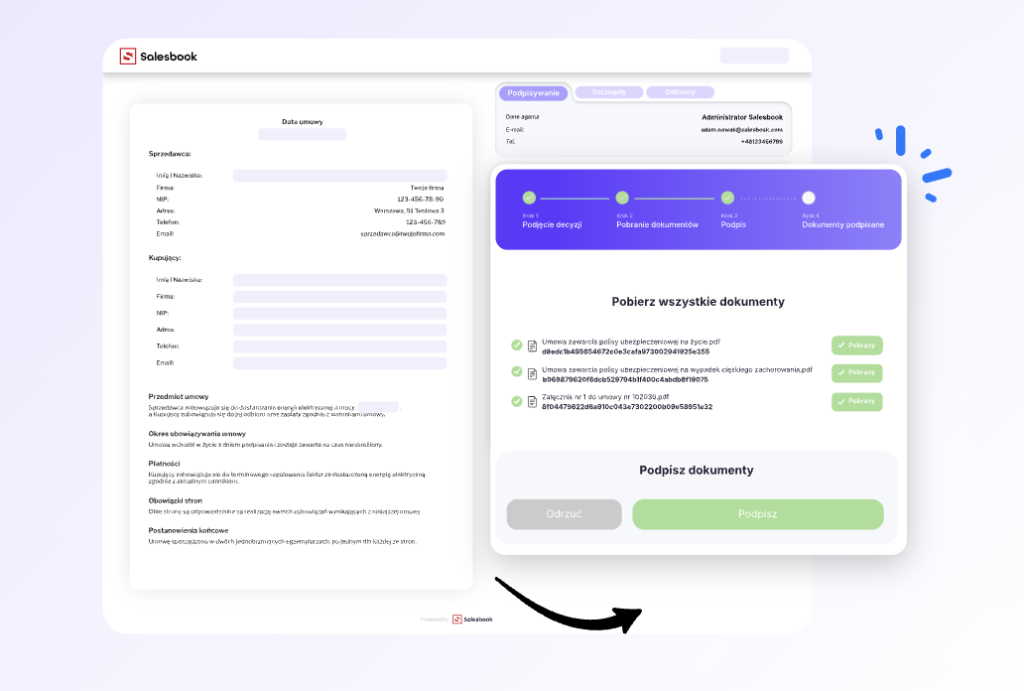
Online document signing without leaving the CRM system
One of the biggest problems when signing contracts is not the signature itself. It is the need to “jump out” of the sales process into other tools. A separate platform for documents, a separate one for CRM, another one for archiving. Every step in a different place.
Salesbook eSign solves this problem at its source. Online document signing takes place exactly where the sales rep and manager already work every day – in the CRM system. The document is not a detached file, but an element of a specific sales process, a specific opportunity, and a specific client.
After uploading or generating a document, the system automatically assigns it to the appropriate thread in the CRM. It sets the number, expiration date, status, and metadata. There is no need to monitor anything manually or remember updates. Everything happens in one logical sequence.
As a result, the sales rep can see what stage the document is at, the manager has full control over contract status, and the company gains a consistent document archive without clutter and duplicates. It is an electronic signature that truly supports sales, not just “closes a PDF.”
How to sign a document online step by step with Salesbook eSign
In practice, online document signing with Salesbook eSign comes down to a few simple steps. No app installation, no complicated procedures, and no technical barriers on the client’s side.
Preparing the document for signature
The process starts with the document. In Salesbook eSign, you can upload a ready file or generate a new one directly in the system, using data already stored in the CRM. Contract, annex, protocol – you choose the document type, and the system automatically sets the number, expiration date, status, and metadata.
At this stage, you also assign the document to the appropriate sales process and indicate the people who are to sign it. Everything happens in one place, without manual data entry and without the risk of mistakes.
Sending the document to the client
When the document is ready, you send it for signature with one click. The client receives a link by email or SMS. They do not need to create an account or install any application. After opening the link, they see the document and the “Sign” button.
Signature confirmation takes place using a one-time code sent via SMS or email. It is fast, intuitive, and convenient, especially for clients who do not want to waste time on technical formalities.
Tracking signature status in real time
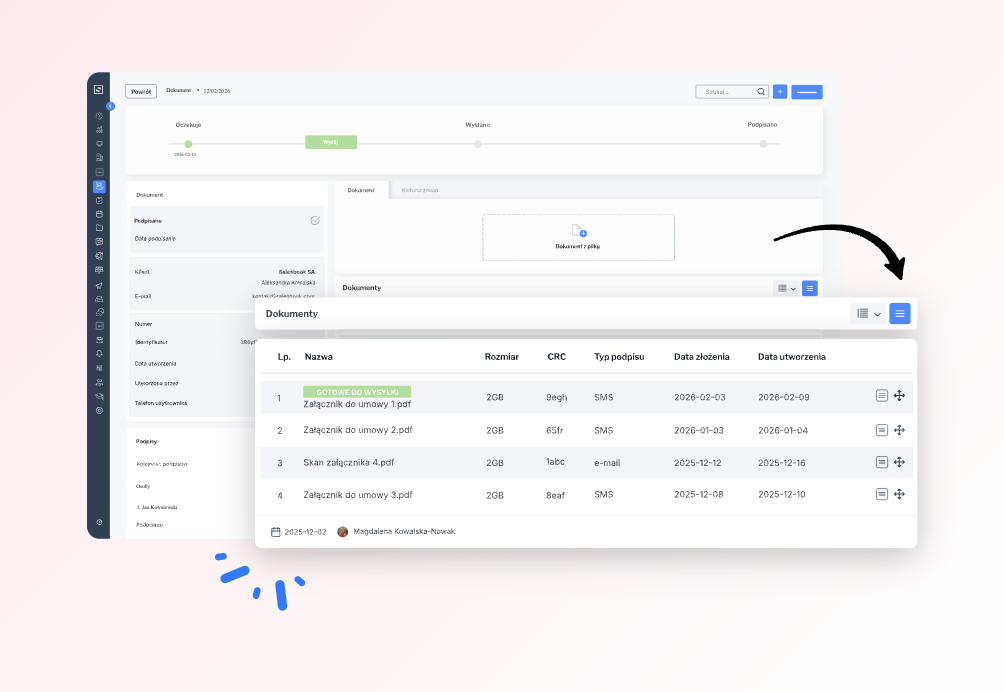
From the moment the document is sent, you have full control over what happens to it. You can see whether the link has been opened, who has already signed the document, and at what stage the entire process is. The status updates automatically, without manual actions on your side.
After collecting all signatures, the system generates the final PDF file with a unique identifier and signature certificate. The document goes to the archive, and the sales process in the CRM moves to the next stage.
Key features of Salesbook eSign
Salesbook eSign is not another “signature tool.” It is a set of specific features that organize the entire contract finalization stage and remove the administrative burden from the sales team.
Electronic signature compliant with regulations
The electronic signature in Salesbook eSign complies with applicable regulations and can be used in real business processes. Each signature is clearly linked to the signing person, the time of signing, and the specific document. The system generates a full audit trail, ensuring that the signed contract has real legal value, not just “technical” value.
For the sales team, this means peace of mind. There is no need to wonder whether the document has been properly signed and whether it can be further processed.
Real-time document statuses
In Salesbook eSign, document status is not a guess. It is information available instantly. You can see whether the document has been sent, whether it is awaiting signature, or whether it has already been signed by all parties.
Statuses update automatically, without manual checking and without asking the client. The sales rep knows exactly what stage the contract is at, and the manager sees where sales are actually happening.
Full history of changes and signatures
Each document has its own history. Who created it, when it was sent, who signed it and at what time. Everything is recorded and available in one place.
This removes any doubt about what was signed and when. If needed, you can quickly return to a specific document and check the full context, without searching through emails and folders.
Central document repository
All documents are stored in one organized repository. Contracts, annexes, protocols, and other files are categorized, assigned to processes, and easy to find.
There is no need to maintain separate archives or store files on local drives. Documents are secure, consistent, and always available within the Salesbook ecosystem.
Why Salesbook eSign outperforms traditional signature tools
No external tools or additional integrations
In many companies, the electronic signature operates in a separate system. It has to be integrated with the CRM, data must be synchronized, and everything has to be monitored to ensure consistency. This generates costs, technical issues, and additional work.
Salesbook eSign operates where sales already take place. It does not require separate tools or complicated integrations. Documents, signatures, and statuses are part of one working environment.
Consistency of the sales process from proposal to contract
In Salesbook eSign, the contract is not “a PDF at the end.” It is the logical next step after the proposal and negotiations. The document is created within the context of a specific sales opportunity and finalized exactly there.
As a result, the entire process is consistent, predictable, and easy to analyze. The manager sees not only signed contracts, but also the points where sales actually stall.
Real time savings for the sales team
The biggest advantage of Salesbook eSign is time. No manual tracking of statuses, no emails with attachments, no document version chaos. Sales reps do not have to deal with administration.
Online document signing stops being a bottleneck in sales. Contracts are finalized faster, and the team can focus on work that actually generates revenue.
Electronic signature and document security and control
In B2B sales, document security is not just a topic “for lawyers.” It is an important element of process and risk control. Salesbook eSign organizes this area in a simple and clear way, without complicating the team’s work.
Who signed, when, and what is always clear. Each signature is clearly linked to a specific person, time of signing, and document. There is no doubt whether the contract has actually been approved and by whom. Everything is recorded in the document history and available in one place.
Equally important is the lack of risk of outdated versions. The document sent for signature is the only valid version. There is no file circulation, no locally introduced edits, and no risk that the client will sign something other than the current content. After signing, the document becomes closed and protected against changes.
This provides order that matters both for sales and for management. Sales reps know what stage contracts are at. Managers see the real status of sales finalization. No assumptions, no manual reports, and no searching for information in emails.
Who Salesbook eSign is best suited for
Salesbook eSign was designed for companies where document signing is a daily routine.
The greatest benefits will be experienced by B2B sales teams working on multiple opportunities at the same time and who cannot afford chaos at the final stage of the process. When contract signing is fast and predictable, sales simply move forward.
It is also an ideal solution for sales managers and sales directors. Instead of asking sales reps about contract status, they can check it themselves. They see where the process stalls and where action is needed.
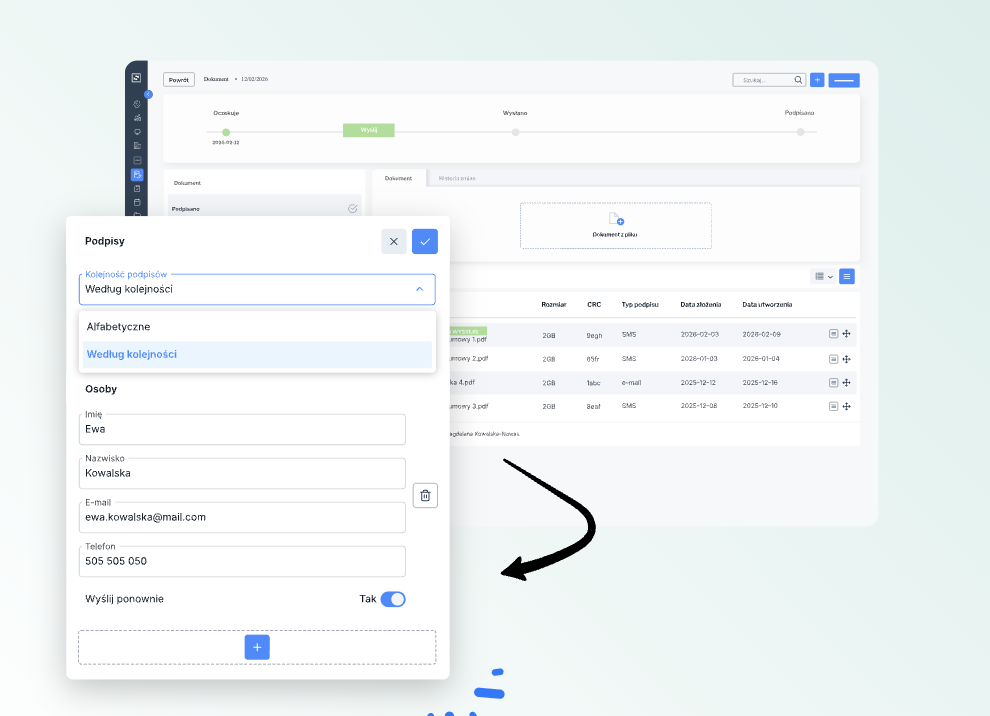
Salesbook eSign is also well suited for companies with long and complex decision-making processes, where a document must pass through several people on both sides. Sequential signing, automatic statuses, and a full history of actions allow control to be maintained even in more complex decision structures within the Salesbook ecosystem.
Summary – online document signing as real sales support
Salesbook eSign is not another “nice feature.” It is a practical tool that truly relieves the sales team.
It means less operational work for sales reps. No emails with attachments, no tracking statuses, no manual document organization.
It means faster contract closing, because the client can sign the document immediately, without technical barriers and unnecessary steps.
And finally, it means full control over the process, from the perspective of both the sales team and management. Online document signing stops being a brake and becomes a natural and predictable conclusion of the sales process.
Table of Contents